Amazon Web Services (AWS) offers powerful networking tools like Virtual Private Cloud (VPC), subnets, security groups, and Internet Gateways to create secure, scalable cloud infrastructures. These components work together but serve distinct roles. In this blog, we’ll explore what a VPC is, how subnets and Internet Gateways fit in, how security groups differ, and walk through a practical example of setting up a NestJS app on an EC2 instance connected to an RDS database.
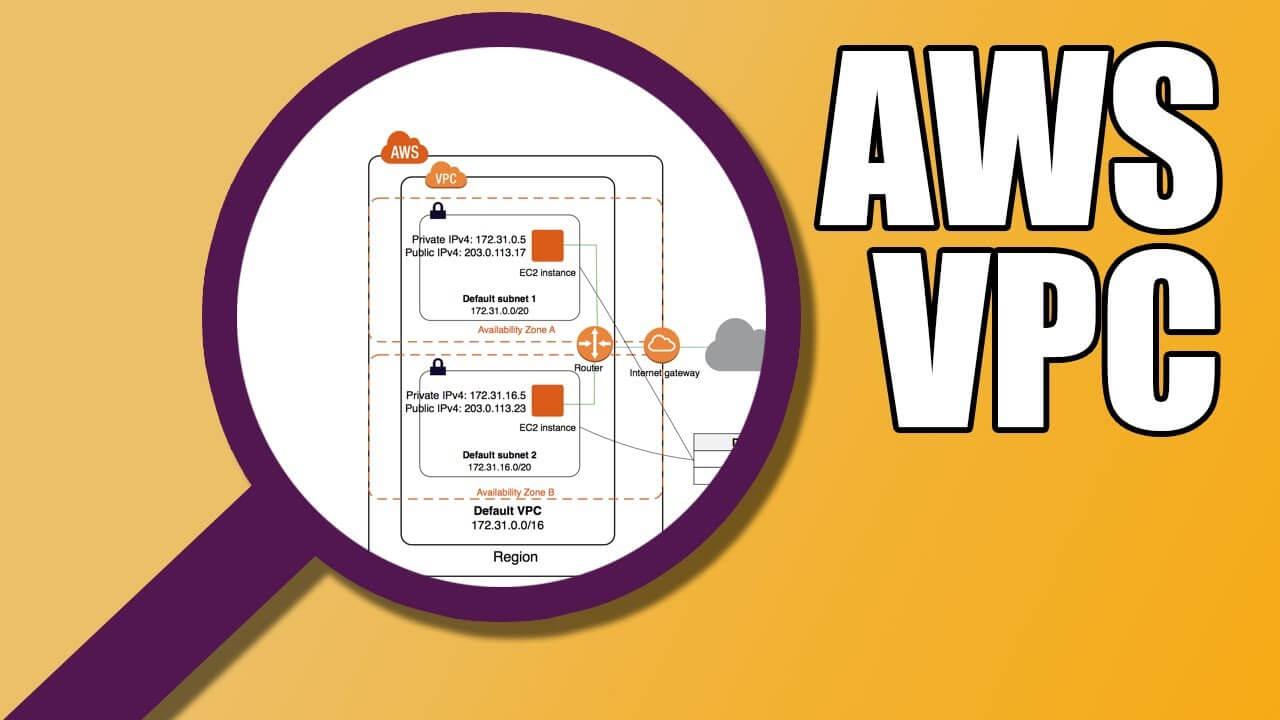
A Virtual Private Cloud (VPC) is your isolated network within the AWS cloud, where you can deploy resources like EC2 instances or RDS databases. It’s like your private sandbox, giving you control over IP ranges, routing, and connectivity. When you create a VPC, you assign a CIDR block (e.g., 10.0.0.0/16) to define its IP address space.
Key features:
- Isolation: Your VPC is separate from others unless explicitly connected.
- Customization: You control routing, subnets, and gateways.
- Scalability: Add subnets or adjust configurations as needed.
Subnets segment your VPC’s IP range into smaller blocks (e.g., 10.0.1.0/24), each tied to an Availability Zone (AZ). They help organize resources and define public or private access:
- Public Subnet: Connected to the internet via an Internet Gateway.
- Private Subnet: Isolated from the internet, often used for databases or backend services.
Subnets rely on routing tables to determine how traffic flows, which brings us to the Internet Gateway.
An Internet Gateway (IGW) is a VPC component that enables communication between your VPC and the internet. When you set up a VPC, it’s isolated by default. To make a subnet public—allowing resources like an EC2 instance to send/receive internet traffic—you must:
- Attach an Internet Gateway to the VPC.
- Update the subnet’s route table to direct traffic (e.g., 0.0.0.0/0) to the IGW.
Without an IGW, your VPC remains a closed network, even if it has public subnets defined.
A security group is a virtual firewall that controls traffic to and from individual resources (e.g., EC2 instances or RDS databases). It operates at the instance level, not the network level, and uses rules to allow/deny traffic based on:
- Protocol (e.g., TCP)
- Port (e.g., 3000 for NestJS)
- Source/destination (e.g., IP range or another security group)
Security groups are stateful, meaning if inbound traffic is allowed, the response is permitted automatically.
- VPC: Defines the network boundary and IP space.
- Subnets: Segments the VPC and uses routing (via IGW) for internet access.
- Internet Gateway: Bridges the VPC to the internet.
- Security Group: Controls traffic at the resource level.
Let’s set up a VPC, subnets, an Internet Gateway, and security groups for a NestJS app running on an EC2 instance, connected to an RDS database.
- Go to the AWS VPC console.
- Create a VPC:
- Name: nestjs-vpc
- IPv4 CIDR: 10.0.0.0/16
- Enable DNS hostnames and DNS resolution (for RDS connectivity).
Create two subnets in different AZs (e.g., us-east-1a and us-east-1b):
- Public Subnet:
- Name: public-subnet-1
- CIDR: 10.0.1.0/24
- AZ: us-east-1a
- Private Subnet:
- Name: private-subnet-1
- CIDR: 10.0.2.0/24
- AZ: us-east-1b
- Create an Internet Gateway:
- Name: nestjs-igw
- Attach it to nestjs-vpc.
- Update the public subnet’s route table:
- Create a route table (public-rt) and associate it with public-subnet-1.
- Add a route: Destination 0.0.0.0/0 → Target nestjs-igw.
The private subnet’s route table (private-rt) remains without an IGW route, keeping it isolated.
- EC2 Security Group (for NestJS app):
- Name: nestjs-sg
- VPC: nestjs-vpc
- Inbound Rules:
- Type: HTTP, Port: 3000, Source: 0.0.0.0/0 (public access)
- Type: SSH, Port: 22, Source: /32 (meaning only 1 ip for admin access)
- Outbound: Allow all traffic (default).
- RDS Security Group (for database):
- Name: rds-sg
- VPC: nestjs-vpc
- Inbound Rules:
- Type: MySQL/Aurora, Port: 3306, Source: nestjs-sg (only EC2 can connect)
- Outbound: Allow all traffic.
- Launch an EC2 instance:
- AMI: Amazon Linux 2
- Subnet: public-subnet-1
- Security Group: nestjs-sg
- Assign a public IP (auto-assign enabled).
- SSH into the instance, install Node.js, and deploy your NestJS app:
- Launch an RDS instance (e.g., MySQL):
- VPC: nestjs-vpc
- Subnet Group: Include private-subnet-1 (and another private subnet if multi-AZ).
- Security Group: rds-sg
- Publicly Accessible: No.
- Note the RDS endpoint (e.g., mydb.xxxx.us-east-1.rds.amazonaws.com).
- Configure your NestJS app (e.g., in app.module.ts) to connect to the RDS endpoint:
- Access your NestJS app at http://ec2-public-ip:3000.
- The app should connect to the RDS database in the private subnet, while the public subnet and IGW enable internet access to the EC2 instance.
In this setup, the VPC provides the network foundation, subnets separate public (EC2) and private (RDS) resources, the Internet Gateway enables internet access for the public subnet, and security groups enforce traffic rules. This architecture ensures your NestJS app is publicly accessible while keeping the database secure and isolated. Mastering these components—VPC, subnets, IGW, and security groups—unlocks the power to build robust, secure AWS applications.